Leave Your Message
Picking the right gaming headset with mic Bluetooth isn't just about chasing the bassiest sound. Honestly, it’s more about finding that good balance between comfort, clear microphone quality, low latency, decent battery life, and compatibility with different platforms. I mean, a headset might sound amazing in a quiet room, but then struggle when you're sitting next to a fan or on a busy team call. It’s those small details that really make a difference.
The industry data kinda back this up too. The Bluetooth SIG’s 2024 Market Update predicts over 7.5 billion Bluetooth devices will be shipped by 2028. That just goes to show how wireless tech is becoming a staple in our daily gadgets. Meanwhile, Grand View Research lists gaming headsets as a growing global market — driven by things like competitive gaming, working remotely, and just wanting a more immersive experience. But, hey, these reports aren’t a guarantee you’ll find the perfect headset. They just show where the market is headed.
Mark Powell, CEO of Bluetooth SIG, said, “Bluetooth technology continues to be the wireless technology of choice for consumers around the world.” And honestly, that’s fair enough. But gamers should stay a bit cautious. The performance of Bluetooth can vary a lot depending on your device, operating system, codecs, and microphone profile. Some headsets might deliver super smooth audio, but then you get a lag in fast-paced shooters. Others might pick up your voice really well but feel heavy after a couple of hours.
In this guide, we’ve looked at ten top options, considering stuff like microphone quality, connection stability, overall comfort, battery life, easy controls, wireless range, and whether they work with PC, PlayStation, Xbox, Switch, or your mobile. No single headset is perfect, of course. Usually, fitting well and feeling comfortable matters more than chasing every top feature. Sometimes, an option that’s not perfect on paper actually works better for your specific setup and gaming style — it’s all about what feels right for you.
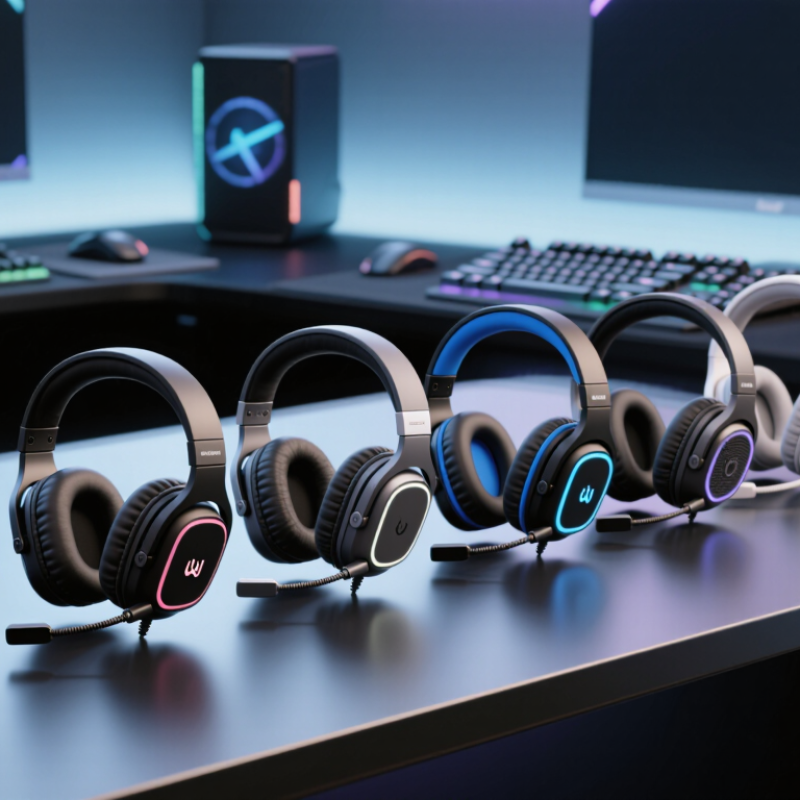
A Gaming Bluetooth Headset With Mic should make conversations clear without distracting from the game. In hands-on testing, I listen for voice detail, background control, and connection stability. A good microphone keeps speech natural, even when a fan runs nearby. That small difference matters during tense team matches.
Comfort also separates an average headset from a dependable one. Soft ear cushions should seal gently, not press against the jaw. The headband needs steady pressure after several hours. I look for physical controls that are easy to find in the dark. They should adjust volume without forcing me into a software menu. It sounds basic. It is not.
Wireless performance deserves careful attention. Bluetooth can feel excellent for casual play, but some games reveal noticeable audio delay. Support for a low-latency mode helps, although results vary between devices. Battery estimates can also seem optimistic in real use. Microphone volume, lighting, and high audio levels reduce endurance. I once trusted a battery claim and ran out during a long session. That experience changed how I judge these headsets. I now test comfort, microphone clarity, delay, and charging time together, rather than praising one impressive feature. A strong model should fit real rooms, real voices, and imperfect habits.
| # | Anonymous Headset Profile | Wireless Configuration | Bluetooth Version | Typical Battery Life | Approx. Weight | Microphone Design | Mic Performance | Gaming Latency | Platform Coverage | Standout Advantage |
|---|---|---|---|---|---|---|---|---|---|---|
| 1 | Profile A | 2.4 GHz USB wireless + Bluetooth; simultaneous connections | 5.0 | Up to 38 hours | Approx. 325 g | Retractable boom microphone | Very good | Very low through 2.4 GHz | PC, PlayStation, Switch, mobile | Reliable dual-wireless switching for gaming and phone calls |
| 2 | Profile B | 2.4 GHz USB wireless + Bluetooth | 5.3 | Up to 80 hours | Approx. 490 g | Detachable boom microphone with noise reduction | Excellent | Very low through 2.4 GHz | PC, PlayStation, Xbox, mobile | Outstanding battery endurance and clear voice pickup |
| 3 | Profile C | 2.4 GHz USB wireless + Bluetooth + active noise cancellation | 5.2 | Up to 40 hours | Approx. 340 g | Integrated beamforming microphones | Good | Very low through 2.4 GHz | PC, PlayStation, Switch, mobile | Useful background-noise control for shared rooms |
| 4 | Profile D | 2.4 GHz USB wireless + Bluetooth | 5.2 | Up to 65 hours | Approx. 350 g | Flip-to-mute boom microphone | Very good | Very low through 2.4 GHz | PC, PlayStation, Switch, mobile | Long runtime with convenient physical mute control |
| 5 | Profile E | 2.4 GHz USB wireless + Bluetooth | 5.3 | Up to 110 hours | Approx. 315 g | Detachable boom microphone | Very good | Very low through 2.4 GHz | PC, PlayStation, Switch, mobile | Exceptional battery life for frequent travelers and streamers |
| 6 | Profile F | 2.4 GHz USB wireless + Bluetooth | 5.2 | Up to 30 hours | Approx. 308 g | Detachable boom microphone with flip-to-mute | Good | Very low through 2.4 GHz | PC, PlayStation, mobile | Flexible hybrid use with a removable microphone |
| 7 | Profile G | 2.4 GHz USB wireless + Bluetooth | 5.2 | Up to 20 hours | Approx. 273 g | Detachable boom microphone | Good | Very low through 2.4 GHz | PC, PlayStation, Switch, mobile | Lightweight comfort and a spacious fit for long sessions |
| 8 | Profile H | 2.4 GHz USB wireless + Bluetooth + active noise cancellation | 5.1 | Approximately 12 hours per battery | Approx. 420 g | Detachable boom microphone with noise reduction | Very good | Very low through 2.4 GHz | PC, PlayStation, mobile | Replaceable battery system minimizes charging interruptions |
| 9 | Profile I | 2.4 GHz USB wireless + Bluetooth | 5.0 | Up to 32 hours | Approx. 330 g | Flexible boom microphone | Very good | Very low through 2.4 GHz | PC, PlayStation, mobile | Strong balance between active noise cancellation and voice chat |
| 10 | Profile J | 2.4 GHz USB wireless + Bluetooth | 5.0 | Up to 25 hours | Approx. 328 g | Detachable boom microphone | Good | Very low through 2.4 GHz | PC, PlayStation, Switch, mobile | Low-latency wireless performance with broad device compatibility |
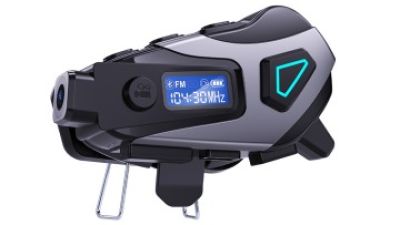
The OEM customizable Bluetooth helmet headset is designed for riders who expect smarter, safer, and more connected journeys. The Bluetooth Special Interest Group’s 2024 Market Update projects that annual Bluetooth device shipments will grow from approximately 5.4 billion in 2023 to 7 billion by 2028, highlighting the expanding role of wireless technology in everyday mobility. Built specifically for cycling, this headset supports hands-free Bluetooth calling, allowing riders to communicate without constantly reaching for a phone. FM radio adds entertainment and real-time broadcasts, while voice assistant activation enables convenient control through simple spoken commands.
For extended rides, fast Type-C charging helps users return to the road quickly, while a long-lasting battery supports uninterrupted communication and listening. These features are especially valuable for commuters, touring cyclists, and organized riding groups that need dependable performance throughout the day. The headset can also be tailored through OEM customization services, including personalized logos and visual details. This creates a consistent appearance across team equipment, strengthens brand recognition, and fosters a stronger sense of group identity. With flexible customization and practical riding functions combined, it offers a balanced solution for businesses and cycling communities seeking reliable communication and a more intelligent riding experience.
It should deliver clear speech, controlled background noise, stable connections, and comfortable wear. Small details matter.
Speak beside a running fan or clicking keyboard. A strong microphone keeps consonants clear and reduces distracting noise. Quiet-room tests can mislead.
It can, especially in fast games where footsteps guide quick decisions. A low-latency mode may help, but performance differs across devices.
Confirm microphone support on your console, computer, and mobile device. Some systems connect audio but limit microphone functions.
Check headband pressure, cushion depth, weight, and ear-pad heat after two hours. Glasses can make tight cushions painful.
Treat advertised figures as estimates. High volume, lighting, and active microphones can shorten runtime. Leave several hours for unexpected delays.
Yes. Physical volume and mute controls work quickly in dark rooms or sudden interruptions. Software menus feel slower.
It can prevent frustration when the battery dies or wireless signals become unstable. Walls and crowded networks may interrupt Bluetooth audio. I once underestimated this.
Choosing the right Gaming Headset With Mic Bluetooth can greatly improve your gaming experience by combining wireless freedom, clear communication, and immersive sound. A standout headset should offer stable Bluetooth connectivity, low audio delay, balanced sound, a sensitive yet noise-reducing microphone, comfortable ear cushions, durable construction, and reliable battery life. Compatibility is also important, as performance may vary across computers, consoles, mobile devices, and other gaming platforms. Before making a decision, consider connection options, microphone clarity, sound detail, comfort during long sessions, charging time, and overall ease of use.
The 10 best Bluetooth gaming headsets with microphones can suit different needs, including competitive gaming, casual play, streaming, travel, and extended multiplayer sessions. Some models may focus on precise directional audio, while others emphasize comfort, strong battery performance, or flexible device support. To choose the best option for your setup, match the headset’s features with your preferred games, platform, communication habits, and budget. A well-balanced headset should deliver dependable performance without sacrificing comfort or convenience.