+86 15889588007
masetti@sonun.com
Noise In Wireless Headphones can turn a quiet commute into an irritating experience. You may hear a low hum, sharp crackle, or faint buzzing between songs. These sounds often come from Bluetooth interference, weak batteries, dirty charging contacts, or active noise cancellation. In 2026, wireless headphones use advanced audio processing, but newer technology does not prevent every fault.
A practical diagnosis starts with simple observations. Does the noise appear only near a Wi-Fi router? Does it continue when Bluetooth is disabled? Try another device, such as a laptop or tablet, and compare the result. Keep the headphones within a few meters of the source. Remove nearby USB hubs, smartwatches, and other active Bluetooth devices. A fully charged battery may also improve unstable performance. It sounds basic. It still helps.
Manufacturer guidance from Sony, Bose, Apple, and Sennheiser can confirm model-specific resets and firmware procedures. Reputable support pages are safer than random software downloads. Clean earbud meshes and charging pins gently, using a dry, soft brush. Do not insert liquid into the housing. Some solutions may fail, especially when a speaker driver or internal circuit is damaged. I have found that users often replace headphones too quickly, while others ignore clear hardware symptoms. That judgment can be wrong. This guide explains reliable checks, realistic repair limits, and signs that professional service or replacement is the sensible choice.
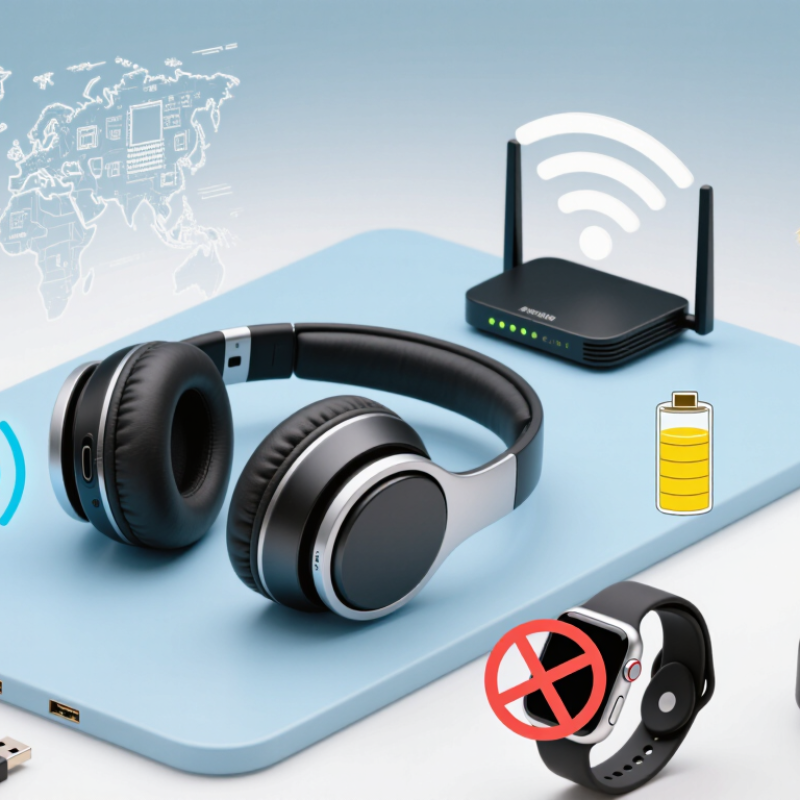
Before changing settings, identify the sound. With Wireless Noise Cancelling Headphones, a soft, steady hiss often comes from amplifier noise or ANC microphones. It should remain similar in a quiet room. Hum sounds lower and may appear near a charger, laptop, or poorly grounded adapter. Disconnect power sources one at a time. Crackle is sharper. It can indicate a loose connection, moisture, damaged cable, or crowded wireless channels. Dry the earcups naturally, then test another device. Never use heat.
Dropouts are different. Audio cuts out, returns, and may worsen behind walls or inside a busy station. Keep the phone nearby, remove unused paired devices, and update firmware through official support instructions. If ANC creates pulses, pressure shifts, or watery voices, you may be hearing an ANC artifact. Compare ANC, transparency, and normal listening modes while standing still. Clean microphone openings gently; blocked ports can confuse the feedback system. I once blamed the headphones when a metal desk and a crowded 2.4 GHz room caused interruptions. That mistake still matters. If the noise follows every device and mode, lower the volume and arrange a professional inspection. If it appears only during calls, test the microphone separately. Record a short sample, note battery level and location, and repeat the test later. Patterns are more trustworthy than one frustrating moment.
Wireless headphone noise often begins with crowded 2.4 GHz airspace. Bluetooth uses the unlicensed ISM band, as documented by the Bluetooth SIG. Wi-Fi, wireless keyboards, game controllers, and microwave ovens can occupy nearby frequencies. Their activity may create clicks, short dropouts, or robotic voices. It usually does not create steady hiss.
The Bluetooth SIG 2024 Market Update projects 5.4 billion Bluetooth device shipments annually by 2028. More devices mean more shared radio traffic. Bluetooth frequency hopping reduces interference, but it cannot erase congestion. I once blamed the headphones after hearing sharp pops beside a busy router. Moving two meters away fixed the problem. That result was useful, but not conclusive.
Test the headphones in the same room with Wi-Fi temporarily disabled. Keep the phone within one meter. Turn off unused wireless accessories. Then repeat the test near the router. If the noise changes, switch the router’s 2.4 GHz channel, or use its 5 GHz network. The Wi-Fi Alliance identifies channels 1, 6, and 11 as the standard non-overlapping choices in many 2.4 GHz deployments. Local regulations and router settings can differ. Do not assume every fault is interference. A constant hiss may indicate amplifier noise, poor audio gain, or an aging battery. For buyers comparing Top Rated Wireless Noise Cancelling Headphones, test both ANC on and off. Quiet rooms reveal electronic hiss better. Sometimes, the obvious explanation is wrong.
Unexpected noise in Wireless Noise Cancelling Bluetooth Headphones often starts with a poor seal. Test the fit before changing settings. Play a quiet spoken recording and listen for thin bass, outdoor hiss, or uneven volume. Rotate each earcup slightly. A small adjustment can make a surprising difference. Use clean, correctly sized ear tips, and check for hair or glasses breaking the seal.
Test ANC modes under controlled conditions, following practical listening-test principles adapted from IEC 60268-1. Keep the same room, audio file, listening level, and test duration. Compare ANC off, low, and high modes with a steady fan nearby. Then test speech, keyboard clicks, and low traffic rumble. Change only one setting at a time. Pause between trials. Memory is unreliable. I once preferred a stronger mode because it sounded louder, not because it reduced more noise.
Keep brief notes after each trial. Record comfort, hiss, pressure, voice clarity, and battery condition. A faint electronic hiss may be normal, but sudden crackling suggests interference, moisture, or a hardware fault. Move away from crowded wireless areas and reconnect the headphones. Firmware updates can help, though they do not repair physical damage. My own results were inconsistent after long sessions, so repeated tests matter. If noise remains in every mode, stop increasing volume and arrange a qualified inspection.
Static, clicking, or faint buzzing can appear even with modern Active Noise Cancelling Wireless Headphones. Firmware updates often fix connection timing, microphone behavior, and noise-control errors. Check the manufacturer’s official support application for the newest firmware. Keep the headphones charged and nearby during installation. Do not interrupt the update. A failed update can create new pairing problems, although this is uncommon.
Bluetooth Core Specification 5.4 improves efficiency and connection management, but both devices must support compatible features. After updating, remove the headphones from your phone’s Bluetooth settings. Restart both devices, then place the headphones into pairing mode again. Re-pair them in a quiet room. I have found that this simple reset removes intermittent crackles more often than changing audio settings. It does not always work. That matters.
Tips: Test another device for comparison. Keep the headphones away from crowded wireless areas, such as routers and busy offices. Clean the charging contacts gently with a dry cloth. If noise appears only when ANC is active, compare ANC, transparency, and standard listening modes. A soft hiss may be normal, but sudden popping is not. Record when it happens, including battery level and distance from the device. This detail helps technical support identify whether the issue involves firmware, interference, or hardware.
A reliable diagnosis starts with one controlled signal. Generate a 1 kHz sine wave at −20 dBFS, following the AES17 measurement convention. Use the same file on a phone, computer, and wireless transmitter. Keep volume fixed, disable equalization, spatial processing, and loudness normalization. Record each source through the same measurement interface. Listen for hiss during the tone, then inspect the silent sections. A steady hiss suggests analog gain noise. Clicking or crackling points toward buffering, interference, or unstable transmission.
AES17-2020 provides a common reference for digital audio measurements. ITU-R BS.1770-5 also reminds engineers that perceived loudness and signal level are not identical. A waveform can measure correctly yet sound harsh after aggressive processing. I once blamed the headphones, but the computer’s output was clipping before transmission. That mistake changed my testing routine. I now compare peak level, RMS level, and noise floor separately. The smallest visible spike can matter.
Keep the test practical. Repeat it beside a wireless router, then several meters away. Compare a local lossless file with a streaming version. Do not trust silence alone; noise may appear only during the 1 kHz signal. The World Health Organization’s 2021 World Report on Hearing estimates that over 1.5 billion people live with hearing loss, making conservative listening levels sensible during testing. Short sessions help. My setup is not perfect, especially with different codecs, so I document codec mode, distance, battery level, and firmware before judging the result.
A sudden hiss, crackle, or uneven volume in wireless headphones often has a simple cause. Start with the battery. Charge it fully, then check whether noise appears only during low power. A swollen shell, unusual heat, or chemical smell requires immediate shutdown and professional inspection. Do not press or puncture the battery.
Next, examine the drivers and connection path. Play a familiar recording at low volume. If one side rattles during bass notes, dust, moisture, or a damaged driver may be responsible. Gently clean the outer grille with a dry, soft brush. Avoid pushing debris inward. Test another device, disable unnecessary sound effects, and check whether the noise changes when the charging cable moves. A bent plug or broken cable can create intermittent crackling. Wireless headphones still depend on cables for charging and, sometimes, wired playback.
Measure listening levels with a calibrated sound meter when possible. Phone readings can be imperfect, but they provide a useful warning. WHO safe-listening guidance supports limiting exposure and stopping use above 85 dBA, especially when sound remains loud for long periods. Give your ears quiet breaks. Ringing is a warning.
I once blamed the drivers too quickly; the real problem was a loose cable connection. That mistake matters. If noise continues after careful testing, stop using the headphones and ask a qualified repair professional to inspect them.
The 2024 reports from Grand View Research and Mordor Intelligence point to continued expansion in the global headphones and Bluetooth audio markets, with industry forecasts indicating double-digit growth in several market segments through 2030. This momentum is being driven by wireless convenience, improved battery performance, and rising demand for connected learning tools. For schools, distributors, and consumer-electronics brands, Bluetooth children’s headphones represent a practical product category that combines education, mobility, and everyday digital use.
Our China-based factory provides OEM and ODM Bluetooth kids’ headphones designed for classrooms, language labs, tablets, and learning spaces. Each model can be customized with logos, colors, packaging, and functional specifications to support different school programs and distribution requirements. Safe volume control helps limit excessive sound exposure, while lightweight construction, soft ear cushions, and an adjustable headband promote comfort during extended study sessions. Reliable wireless connectivity also reduces cable clutter and supports modern classroom environments.
With scalable production, quality-focused suppliers, and flexible customization, we help partners develop personalized audio solutions without compromising usability or student comfort. From initial product concept to finished packaging, our team supports schools, distributors, and private-label businesses seeking dependable Bluetooth headphones for educational applications and expanding global demand.
Crowded 2.4 GHz airspace can cause clicks, brief dropouts, or robotic voices. Nearby routers, keyboards, controllers, and microwaves may contribute. Steady hiss usually has another cause.
Disable Wi-Fi briefly and keep your phone within one meter. Turn off unused wireless accessories. Then repeat the test beside the router. Noticeable changes suggest interference, but they do not prove it.
Try a less crowded 2.4 GHz channel, such as channels 1, 6, or 11. A 5 GHz network may also help. Local settings differ.
It may fix connection timing, microphone behavior, or noise-control problems. Keep the headphones charged and nearby during installation. Do not interrupt the update.
Remove them from the phone’s saved wireless devices. Restart both devices, then pair again in a quiet room. This simple reset often removes intermittent crackles. Not always.
Charge the headphones fully and check whether noise appears only at low power. Stop using them if the shell swells, becomes hot, or smells chemical. Never puncture the battery.
Play a familiar recording at low volume. Dust, moisture, or a damaged driver may cause rattling during bass notes. Clean only the outer grille with a dry brush.
Yes. Move the cable gently while listening at low volume. A bent plug or loose connection may produce intermittent crackling. I once blamed the drivers too quickly.
Stop if noise continues after careful testing, or if the battery shows swelling or unusual heat. Seek qualified repair help. Keep listening below 85 dBA when possible.
No. A faint hiss may appear during active noise control or quiet listening. Sudden pops are less normal. Compare noise-control modes in a silent room.
Noise In Wireless Headphones can come from several different causes, so the first step is to identify whether the problem is hiss, hum, crackling, dropouts, or an unusual artifact from active noise cancellation. Check for nearby 2.4 GHz interference, then test the headphones with different fit positions and ANC modes in a quiet environment. A secure fit and a mode change can quickly reveal whether the sound is caused by software processing or by the physical connection.
Next, update the firmware, remove the headphones from the device, and pair them again. Compare multiple audio sources with a clean 1 kHz test tone at a moderate level to determine whether the issue is in the recording, device, or headphones. Finally, inspect the battery, speaker drivers, and cables for damage or wear. If distortion continues, stop using the headphones and avoid listening above 85 dBA to protect your hearing.