+86 15889588007
masetti@sonun.com
Picking out a good pair of Headphones With Microphone might sound straightforward, but trust me, it’s a whole different story once you’re actually using them. Suddenly, that muffled call, a tight headband, or an annoying cable can really throw you off. The right headphones should fit your real-life habits—whether you're working, gaming, or chatting—not just look sleek in a product shot. Good voice clarity is a must. And yeah, after an hour or so, comfort really matters—something to keep in mind beyond that quick test fit.
There’s this interesting research by audio scientist Dr. Sean Olive that’s worth keeping in mind. Turns out, how headphones sound can totally vary based on how they fit and what you’re used to listening to. That’s not just opinion—it’s backed by solid research. When it comes to a mic, if you can, try listening to a test recording. Make sure your voice sounds natural and consider if background noises like keyboard clicks or nearby chatter are sneaking in and becoming distracting. Sometimes, those tiny details make all the difference.
This guide highlights ten practical tips, like microphone clarity, comfort level, connection type, device compatibility, controls, and how durable they are. Oh, and where you’ll be using them — whether at a quiet desk, on the go in a busy commute, or sharing space with others. If storage is an issue, a detachable mic might be handy. A boom mic keeps your voice right in the sweet spot, making it clearer, but that’s not for everyone. No single pair will fit every need perfectly, and honestly, you might need to do a bit of trial and error. Use these tips to compare what you need with what’s out there, and don’t buy into the marketing hype too quickly. Ultimately, the best choice is the pair that’s comfortable, works smoothly with your devices, and helps keep everyday conversations hassle-free.
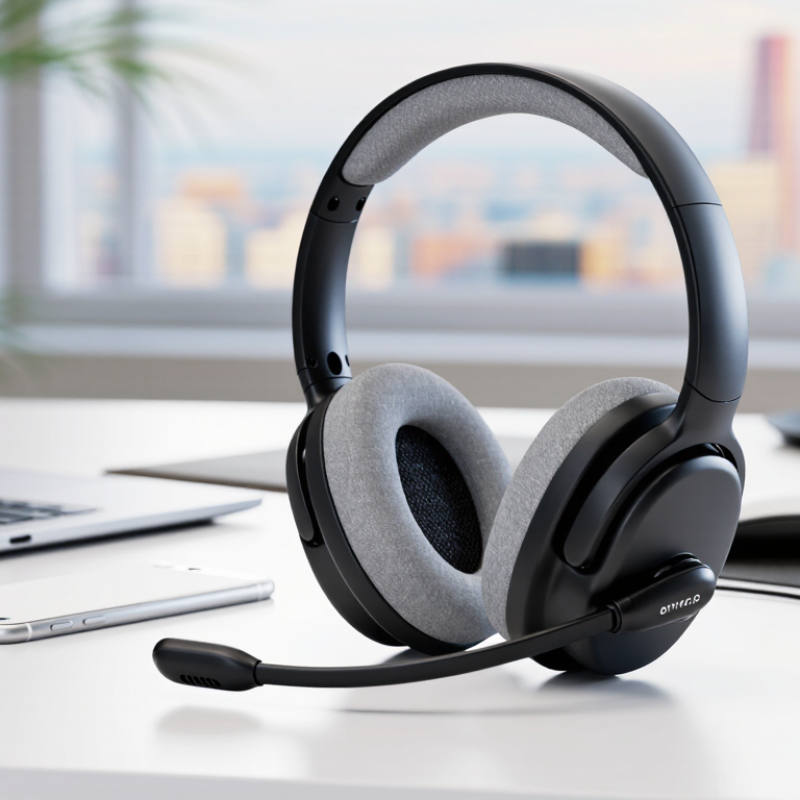
Before comparing specifications, identify when you will use the headphones and what matters most in those moments. A headset for quiet calls at home may need a different microphone than one used beside traffic or in a shared office. On a commute, you may value a secure fit and controls you can find without looking. At a desk, clear speech and comfortable ear cups may matter more than compact size. Be specific.
Think about how long calls last, how often you switch devices, and whether you need to hear your surroundings. Bluetooth Headphones With Microphone can suit flexible work and everyday listening, but wireless convenience does not guarantee a clear voice in every room. Check how the microphone handles ordinary background sounds, and look for controls that are easy to use during a real call. Short calls? Comfort still counts. I used to focus too much on sound quality and overlook pressure around my ears after an hour. That was a poor measure of daily comfort. Write down your usual listening and calling situations, including one annoying detail, such as a noisy fan or glasses pressing under the ear cups.
Choosing a headphone style changes how long you can wear it comfortably and how clearly your microphone picks up your voice. Over-ear models surround the ears, leaving room for cushioned pads and often a boom microphone near the mouth. They can feel warm after an hour, especially in a sunny room. On-ear designs rest directly against the ears. They are easier to carry, but firm pads may become tiring during long calls. Small detail, big difference.
Earbuds sit inside the ear and suit walking between meetings or taking calls on the move. Their tiny microphones may pick up wind or clothing rustle, so test them outdoors before relying on them. Open-back headphones can feel airy at a desk, but sound escapes and nearby voices may reach your microphone. A closed-back design usually limits that leakage, though it may feel less cool. Fit still matters.
Searches for “Headphones Wireless With Microphone” can show several wearing styles, so check the shape rather than judging by the listing alone. Try moving your head, adjusting the headband, and speaking at a normal volume. I used to focus on sound quality first; that was not always practical. A headset that sounds excellent but slides down during a call is still a poor fit. If possible, wear it for twenty minutes before deciding.
| Tip | Style or Wearing Design | Typical Microphone Design | Advantages | Things to Consider | Best Suited To |
|---|---|---|---|---|---|
| 1. Match the fit to your listening habits. | Over-ear headphones: ear cups surround the ears. | Usually a microphone on the ear cup or a detachable boom mic. | Large ear cups can feel comfortable for extended listening; closed-back designs can help reduce outside sound reaching the listener. | Can be warm or bulky, and noise isolation varies by model and fit. | Desk work, calls, gaming, and longer listening sessions. |
| 2. Check whether you prefer a lighter, more open fit. | On-ear headphones: padded ear cups rest on the ears. | Often built into an ear cup or attached to a short boom. | Usually more compact than over-ear designs and may feel less enclosing. | Pressure on the ears and sound leakage can be noticeable; comfort depends on headband tension and ear-pad shape. | Shorter listening sessions, commuting, or users who prefer smaller ear cups. |
| 3. Consider how securely you want the earbuds to stay in place. | In-ear wired earbuds: earpieces sit in the ear canal or at its entrance. | Commonly an inline microphone on the cable; some designs use a small boom. | Lightweight and easy to carry; a wired connection does not require headphone battery power. | Fit and microphone position affect call clarity. Check device compatibility and connector type before buying. | Portable use, calls on compatible devices, and users who prefer a cable. |
| 4. Check battery life and call controls for cable-free use. | True wireless earbuds: separate earpieces with no cable between them. | Small microphones are built into each earpiece; call processing differs by model. | Highly portable, with no cable to snag; many charging cases provide additional recharging opportunities. | The earbuds need charging, and call performance can vary with fit, wind, and surrounding noise. Check whether controls suit your needs. | Mobile calls, travel, and everyday listening without a cable. |
| 5. Choose a neckband if you want wireless earbuds that stay connected. | Neckband earbuds: earpieces connect to a band worn around the neck. | Microphones and controls are often placed on the earpieces or neckband. | The band can make the earbuds easier to find and less likely to be misplaced when removed. | The neckband may feel distracting, and the product still needs charging if it is wireless. | Users who want wireless listening but prefer not to handle two fully separate earbuds. |
| 6. Decide whether you need to hear your surroundings. | Open-ear headphones: sit near the ear rather than sealing the ear canal. | Usually built into the frame or an earpiece. | Can let the wearer hear more ambient sound than sealed in-ear or closed-back designs. | Nearby people may hear audio, and environmental noise can make calls harder to hear. | Situations where awareness of nearby sounds is useful; remain attentive to traffic and other hazards. |
| 7. Compare bone-conduction fit with conventional audio designs. | Bone-conduction headphones: transducers rest against the cheekbones, leaving the ears uncovered. | A small microphone is generally built into the frame. | Leaves the ear canals open and can be worn without placing earbuds inside them. | Sound quality and bass perception differ from conventional headphones; fit and sound leakage vary by design. | Listeners who want uncovered ears, subject to the design’s comfort and audio trade-offs. |
| 8. For frequent calls, look for a well-positioned boom microphone. | Headset with a boom: over-ear or on-ear cups paired with an adjustable microphone arm. | The boom places the microphone near the mouth; some models allow it to be muted or detached. | Mic position is adjustable and easy to see, which is useful for regular voice communication. | The boom can add bulk. A boom mic does not guarantee noise cancellation, so check the product’s microphone specifications. | Video meetings, gaming, and other uses where voice pickup is a priority. |
| 9. Check the connection and controls before purchasing. | Single-ear or mono headset: one earpiece, commonly with a headband or ear hook. | Often includes a boom microphone close to the mouth. | Keeps one ear uncovered and may provide easy access to call controls. | Provides audio to one ear only. Wired and wireless versions have different connector, compatibility, and charging requirements. | Call-focused work where hearing nearby conversation is important. |
| 10. Prioritize comfort and practical features over appearance alone. | USB office headset: usually on-ear or over-ear, connected by USB cable or a wireless USB adapter. | Commonly has a boom microphone and an inline or on-ear mute control. | Designed for computer use; some versions offer convenient call controls and a dedicated computer connection. | Verify operating-system and application compatibility, wearing comfort, cable length, and whether a wireless adapter is required. | Office calls, online meetings, and computer-based communication. |
Evaluate sound with recordings you know well, not only promotional samples. A balanced headset should keep voices clear without making music thin or harsh. Listen for sibilance, muddy bass, and distortion at your usual volume. Try spoken audio, music, and a quiet game scene. Small differences become obvious. Comfort matters too; clamp pressure can change how headphones sound after an hour.
Tip: Test the microphone in the room where you’ll use it. Record a short voice note from normal speaking distance, then listen for muffled words, hiss, and sudden volume changes. Repeat near a fan or keyboard. A microphone that sounds clean in silence may struggle with everyday noise. Not always.
Check whether your voice stays understandable when you turn your head or lean back. For calls, natural speech matters more than exaggerated bass or a very loud sidetone. Compare wired and wireless modes if both are available, since processing can differ. I’ve found quick tests useful, but they are imperfect: one recording cannot predict every room or app. Pay attention to fatigue during a longer call, not just the first minute.
Comfort is not a luxury; it determines whether a headset stays usable after an hour of calls. Check whether the headband spreads pressure across your crown, rather than pressing on one small spot. Ear cups should fully surround your ears without touching them, and glasses should not create a sharp pinch. A loose fit can also let microphone audio drift as you move. Try Wireless Bluetooth Headphones With Microphone while seated and standing, then wear them for at least 30 minutes. Fit matters. Small discomfort grows.
Tips: Adjust the headband in small steps, and test both sides for even pressure. Note warmth, slipping, and soreness near the jaw. If possible, repeat the test on another day; one short try can miss trouble. The details are easy to overlook.
Long sessions also call for sensible volume. NIOSH’s Criteria for a Recommended Standard: Occupational Noise Exposure sets 85 dBA over eight hours as its recommended exposure limit, using a 3 dB exchange rate. That is workplace guidance, not a personal headphone comfort rating, but it is a useful reason to keep listening levels moderate. WHO’s World Report on Hearing projects that nearly 2.5 billion people may have some degree of hearing loss by 2050. Comfort testing cannot prevent every problem. It can reveal a poor fit early, though even careful checks may miss pressure that appears after a full workday.
Before buying Bluetooth Headphones And Microphone, check the exact device you plan to use: phone, laptop, tablet, or game console. Bluetooth SIG’s 2024 Market Update forecasts more than 7 billion Bluetooth device shipments annually by 2028, but that growth does not guarantee every headset supports every feature. For calls, confirm the headset and device support a compatible hands-free profile, such as HFP. A headset may play music yet fail to send microphone audio correctly. Check before buying.
A laptop’s Bluetooth version matters, but so do its operating system, drivers, and call settings. If you need reliable voice pickup, look for explicit support for calls or voice communication, not just “wireless audio.” Wired models need checking too: USB-C ports do not always carry audio, and a 3.5 mm headset may require a compatible four-pole jack or adapter. Not just the plug. Test the microphone with your actual device before an important meeting; a quick voice recording can reveal muffled sound or connection dropouts. I still find compatibility tables easy to overlook, and they can be vague. Look for the manufacturer’s supported-device list, then verify the connection type and microphone function yourself.
Check the headband, hinges, and cable before judging a headset by its first impression. Flex the headband gently and look for creaking, loose joints, or thin plastic around the hinges. These spots take repeated strain during daily use. If the cable is detachable, replacement may be easier; if it is fixed, inspect the strain relief near each connector. Small details matter.
Controls should be easy to find without looking away from your screen. Try the mute switch and volume wheel while wearing the headset, since tiny controls can feel awkward through earcups. A clear mute indicator is useful, but check whether it shows your microphone’s actual status or only the button position. That distinction is easy to overlook.
For overall value, compare comfort, repairability, microphone clarity, and warranty terms against the price. A lower-cost model may be sensible for occasional calls, while long work sessions make breathable cushions and a stable fit more important. Read warranty exclusions carefully. They can be disappointing. If possible, test the headset for at least fifteen minutes; pressure near the temples may not show up in a quick shop trial. My own buying checklist would still miss something, so leave room for return policies and real-world testing.
Assess durability, controls, and overall value with this practical buying checklist.
Priority ratings are editorial guidance on a 1–5 scale, not laboratory test results. Consider your intended use and budget when comparing options.
Grand View Research estimates that the global headphones market was valued at USD 58.3 billion in 2023 and projects a 5.7% compound annual growth rate from 2024 to 2030. This expanding market creates opportunities for products that combine practical performance with distinctive identity. Custom-logo, over-ear ANC headphones with up to 50 hours of battery life can serve businesses seeking differentiated audio products for retail, corporate gifting, or private-label programs.
For suppliers and buyers, ODM production makes it possible to tailor design, technical features, and packaging to specific market needs. Professional noise-reduction technology helps reduce ambient distractions, while acoustic tuning supports clear audio, enhanced low-frequency response, and high fidelity. Bluetooth connectivity offers everyday wireless convenience, and a 3.5 mm interface provides a wired listening option. Together, these features align with demand for adaptable, long-lasting headphones while giving customers room to apply their own logo and brand styling.
Over-ear models offer cushioned pads and often place the microphone near your mouth. They may feel warm after an hour.
They are easier to carry, but firm pads can tire your ears during long calls. Try them for fifteen minutes.
They work well while walking between meetings. Wind or clothing rustle may affect their small microphones. Test them outdoors.
Open-back designs feel airy at a desk, but sound can escape. Nearby voices may reach your microphone. Closed-back styles limit leakage but may feel warmer.
Move your head, adjust the headband, and speak at normal volume. Wear it for about twenty minutes if possible. Fit still matters.
Gently flex the headband and check the hinges for creaking or loose joints. Inspect thin plastic and cable strain relief near connectors.
Try the mute switch and volume control while wearing the headset. Check whether the mute indicator shows actual microphone status. Easy to miss.
Consider comfort, repair options, microphone clarity, and warranty terms. Breathable cushions matter during long sessions. I still overlook something, so real-world testing and return options help.
Choosing Headphones With Microphone starts with understanding how you plan to use them. Consider whether they are mainly for calls, music, gaming, or a mix of activities, then compare over-ear, on-ear, and in-ear designs to find a style that suits your surroundings and preferences. Listen for clear, balanced audio, and check that the microphone captures your voice naturally while reducing distracting background noise.
Comfort and fit matter, especially during long sessions, so look for suitable cushioning, an adjustable design, and a secure fit. Confirm that the headphones work with your devices and offer the connectivity you need, such as a wired connection or wireless pairing. Finally, assess the controls, build quality, and expected durability alongside the price. Weighing these factors together can help you choose a practical, comfortable pair that delivers dependable sound and clear communication.